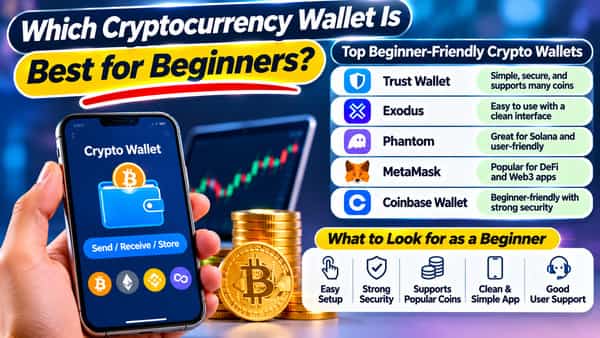
The best cryptocurrency wallet for beginners is usually a free, well-established self-custody app such as Trust Wallet, Exodus, MetaMask, or Phantom for small everyday amounts, paired with an entry-level hardware wallet such as the Ledger Nano S Plus or Trezor Safe 3 once your holdings grow large enough that losing them would hurt. No single wallet is best for everyone, because the right choice depends on which blockchain you’ll use first, whether you prefer phone or computer, and how comfortable you are keeping a recovery phrase safe. What matters most for a newcomer is picking a reputable wallet from its official source and understanding how recovery works before sending any money. This is general information, not a product endorsement or investment advice.
What a Wallet Actually Does
A crypto wallet doesn’t store coins the way a leather wallet stores cash. The coins live on the blockchain, and the wallet stores the private keys that prove you own them and let you move them.
- Non-custodial (self-custody) wallets give you the keys. Nobody else can move your funds, and nobody can recover them for you if you lose access.
- Custodial wallets, such as the balance held in an exchange account, are managed by a company that holds the keys on your behalf.
- A recovery phrase (often 12 or 24 words) can restore a self-custody wallet on a new device, which makes it the single most important thing to protect.
Hot Wallets vs. Cold Wallets
- Hot wallets are software apps connected to the internet, like mobile apps or browser extensions. They’re free, convenient, and suited to smaller, everyday amounts, though being online means more exposure to phishing and malware.
- Cold wallets (hardware wallets) are small devices that keep your keys offline and sign transactions only after you confirm on the device. They cost money but are widely favoured for larger, long-term holdings.
Many people use both: a hot wallet for spending and experimenting, and a hardware wallet for savings.
Beginner-Friendly Software Wallets
Trust Wallet
- Best for: a free, multi-chain mobile wallet.
- Why beginners like it: a clean phone app supporting more than 100 blockchains, with a simple send and receive flow.
- Keep in mind: swaps and in-app purchases may carry fees, and you must protect your recovery phrase carefully.
Exodus
- Best for: a polished desktop and mobile experience.
- Why beginners like it: a visually friendly interface, portfolio tracking, and support for hundreds of assets, with an option to pair with a hardware wallet.
- Keep in mind: built-in swaps often carry spreads that can cost more than trading on an exchange, so compare before you convert.
MetaMask
- Best for: Ethereum and applications built on it.
- Why beginners consider it: it’s the most widely used wallet for Ethereum, its layer 2 networks, and decentralised apps, available as a browser extension and mobile app.
- Keep in mind: it’s a little steeper for total beginners, and being so popular makes it a frequent target for impersonators.
Phantom
- Best for: Solana, with support for several other networks.
- Why beginners like it: a sleek, easy design, quick transactions, and built-in swaps and staking on Solana.
- Keep in mind: if you won’t use Solana-based assets, a more general wallet may suit you better.
Wallets from large exchanges
- Best for: people already using that exchange who want to try self-custody.
- Why beginners consider them: familiar branding and a smooth transition, with options like passkey-based sign-in on some.
- Keep in mind: check whether the wallet is genuinely non-custodial and what fees apply.
Wallets with alternative recovery
- Some wallets use techniques that don’t rely on a traditional recovery phrase, which can be easier for beginners but works differently, so read how recovery functions before relying on it.
Beginner-Friendly Hardware Wallets
Ledger Nano S Plus
- What it is: an entry-level device from a widely used brand, supporting thousands of assets.
- Typical price: roughly $60 to $80 depending on promotions.
- Keep in mind: it connects by cable to a computer or Android phone and has no Bluetooth, and its software is closed-source.
Trezor Safe 3
- What it is: an entry-level device with open-source firmware and a secure chip.
- Typical price: roughly $60 to $80, depending on promotions.
- Keep in mind: it supports fewer assets than Ledger, though still thousands through its software suite.
Hardware wallets tend to make sense once your holdings reach an amount you’d be uncomfortable losing. Always buy directly from the manufacturer or an authorised reseller, never from a second-hand listing, and check that the packaging is intact.
How to Choose
Match the wallet to what you’ll actually do.
- If you’ll mostly hold Bitcoin or a few major coins: a multi-asset wallet such as Exodus or Trust Wallet, or a hardware wallet for larger amounts.
- If you’ll use Ethereum applications: MetaMask, ideally with a hardware wallet for larger balances.
- If you’ll use Solana:
- If you prefer your phone: Trust Wallet or Phantom.
- If you prefer a computer: Exodus or a hardware wallet with its desktop app.
- If you’re nervous about recovery: practise with a tiny amount first and read the wallet’s recovery instructions carefully.
Setting Up Your First Wallet Safely
Step 1: Download from the official source. Use the developer’s official website or the verified listing in the app store, and check the publisher’s name, since fake apps imitate popular wallets.
Step 2: Create the wallet and write down the recovery phrase on paper or metal, in a safe place, never as a screenshot, email, or cloud note.
Step 3: Set a strong password or PIN and enable device-level security.
Step 4: Test recovery. Many people verify their backup by restoring on a spare device with an empty wallet.
Step 5: Copy your receiving address carefully. Check each character, or scan the QR code.
Step 6: Match the network. Make sure the sending platform and your wallet use the same blockchain, since the wrong network can lose funds.
Step 7: Send a small test amount first, confirm it arrives, then send the rest.
Step 8: Store backups in more than one secure place, such as two separate locations.
Safety Rules Every Beginner Should Follow
Never share your recovery phrase. No genuine support team, exchange, or wallet will ask for it.
Beware of phishing. Fake websites, emails, social posts, and direct messages impersonate wallets and offer “support” or “giveaways.”
Be careful with approvals. When connecting to apps, read what you’re allowing, and revoke permissions you no longer need.
Keep software updated, and use a device free of suspicious apps.
Use a hardware wallet for larger sums.
Double-check addresses before every transaction.
Don’t rush. Scammers use urgency to push mistakes.
What Self-Custody Does and Doesn’t Protect Against
It protects you from relying on one company’s security, outages, or policies.
It doesn’t protect you from your own mistakes: a lost phrase, a wrong address, or a convincing scam can’t be reversed by any helpline.
It means responsibility. If you prefer convenience and account recovery, keeping small amounts on a reputable, registered exchange may suit you better.
India-Specific Notes
- Self-custody wallets are software tools and aren’t the same as regulated exchanges, so keep your own records.
- Taxes apply to crypto gains, with a 1% TDS on eligible transactions on registered platforms, so save transaction histories, including transfers between your own wallets.
- Use registered exchanges to buy and sell, and be wary of unregistered offshore schemes.
- Regulation continues to evolve, so stay informed.
Frequently Asked Questions
Q1. Which is the easiest crypto wallet to use?
A. Beginner-friendly apps such as Trust Wallet, Exodus, and Phantom are often cited as simple, though the easiest one is the one that supports your chain and recovery process you can follow confidently.
Q2. Do I need a hardware wallet as a beginner?
A. Not for small amounts, but many people buy one once their holdings are large enough that losing them would be a serious problem.
Q3. What happens if I lose my recovery phrase?
A. If you lose both your device and the phrase, the funds are generally unrecoverable, which is why safe, offline backups are essential.
Q4. Is a wallet the same as an exchange account?
A. No, an exchange holds your keys for you, while a self-custody wallet gives you the keys and the responsibility.
Q5. Are free wallets safe?
A. Reputable ones can be, provided you download from official sources and follow good security habits, since most losses come from scams and mistakes rather than the software itself.